The Follow-up tracking is a specific module of the SMART platform which provides a patients list with the status of each visit of follow-up for each patient.
Access rights to this module is defined by the right of access to « f / up tracking ».

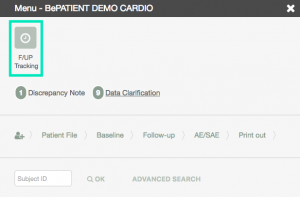
The patients list can be filtered using the left part of the module.
This module allows managing the follow-up visits of the subjects for the clinical trial.
Once the module is opened, first click on “Display with default filter parameter”.
The list of the subjects concerned by the follow-up visits is displayed (see the figure below) with the theoretical date of these visits as well as the range of dates accepted for this visit (upper and lower limits).

You can also follow compliant and not compliant patient.

This list can be filtered using the different type of filters on the left section.
- the site area, the investigator or the subject ID
- the type of follow-up visit
- the status of the follow-up visit (scheduled, ready, outdated, unknown, compliant, not compliant, not applicable).
To remove all the current filters click on the ‘eye’ icon on the right of the section title as shown in the upper screenshot.

It is also possible to display this list one row per patient: instead of one follow-up per row, there is all the follow-up information per patient in one row (see below).

The number of manual queries is displayed per visit if the module is active in the study and the user has the right to at least see the queries. Archived or resolved queries will be excluded from the count (only « awaiting answer » queries will be taken into account in the calculation)
The number of automatic queries is displayed per visit if at least one indicator is visible to the logged-in user and the number of queries is calculated on all the indicators visible to the connected user. Automatic queries solved manually will be excluded from the count.

If at least one « Fup Done » option is checked in the search screen, then the status of the visit is displayed.
If none of the visit pages are completed, then the visit status would be « Ready for data entry ».
If at least one of the visit page is filled in, then the visit status would be « Draft ».
If all the visit pages are signed, then the visit status would be « Completed ».

